SMART SAVINGS FOR LIFE AFTER 50

More life.
More benefits.
More savings.

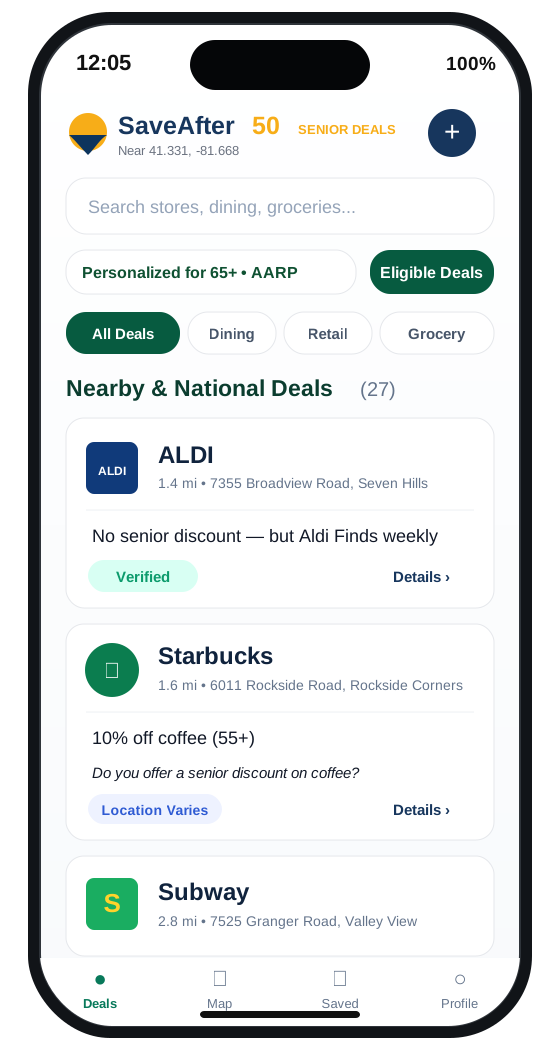
SaveAfter50 helps you discover discounts, benefits, programs and opportunities that can help your money go further — without making you dig through dozens of websites.

✓ Simple to use ✓ Local + national savings ✓ No app store required
SaveAfter50 app showing nearby and national deals, eligibility filters, and saved deals
ONE SIMPLE PLACE

Saving after 50 should be easier.

SaveAfter50 brings useful savings opportunities together so you can spend less time searching and more time enjoying them.

%

Find Savings

Discover local and national discounts across everyday categories.

★

Explore Benefits

Find programs, resources and benefits that may be relevant to you.

♡

Save Favorites

Keep useful deals and resources together so you can find them again fast.

↗

Make Money Go Further

Turn small savings into meaningful value across the year.

SAVINGS THAT FIT REAL LIFE

Look for savings where you actually spend.

From a night out to your next trip, SaveAfter50 is built to organize useful opportunities around the things that matter to you.

Explore SaveAfter50 →
🍽Dining
✈Travel
🛍Shopping
🚗Automotive
⌂Home
♥Wellness
♪Entertainment
⌖Local Programs
50+
A smarter advantage
NOT ABOUT SLOWING DOWN

Turning 50 should mean knowing where the advantages are.

SaveAfter50 is designed around opportunity, not age stereotypes. The goal is straightforward: help you identify worthwhile savings, benefits and programs without making the experience feel complicated or outdated.

  • ✓Clear, easy-to-read information
  • ✓Useful opportunities organized in one place
  • ✓Built for phones, tablets and computers
TAKE SAVEAFTER50 WITH YOU

Install SaveAfter50 on any device.
No app store required.

Choose your device below. SaveAfter50 can live on your iPhone or iPad Home Screen, your Android Home Screen, or your computer like an installed app.

iPhone & iPadInstall with Safari
  1. Open SaveAfter50 in Safari.
  2. Tap the Share icon.
  3. Select Add to Home Screen.
  4. Turn on Open as Web App, then tap Add.
Open for iPhone or iPad →
AndroidInstall with Chrome
  1. Open SaveAfter50 in Chrome.
  2. Tap the browser menu.
  3. Choose Install app or Add to Home screen.
  4. Follow the prompts to finish.
Open for Android →
DesktopChrome, Edge or supported browser
  1. Open SaveAfter50 on your computer.
  2. Look for the Install icon in the address bar or browser menu.
  3. Choose Install SaveAfter50.
  4. Follow the prompts. It will open in its own app window.
Open on This Computer →
QR code to open SaveAfter50 app Open on your phone Scan the code with your camera app.saveafter50.com
HELP KEEP SAVINGS USEFUL

Know about a deal or a change?

Share a new savings opportunity, correct an outdated listing or help confirm what works. Every submission is reviewed before it becomes part of the public directory.

Submit or Update a Deal Business participation → Listings and corrections are free. Paid placement never determines verification.
PRIVACY MATTERS

Your information should stay yours.

SaveAfter50 should only ask for information needed to improve your experience. We recommend keeping personal-data collection minimal and explaining clearly how any information is used.

SaveAfter50 app icon
READY TO START?

Make your money go further after 50.

Open SaveAfter50 →